Automatic invoicesClosures → invoice
Turn closures into invoices.
Automatically.
One workspace for the admin behind every field job.
Spend less time building invoices, tracking expenses, preparing mileage logs and gathering year-end records for your accountant.
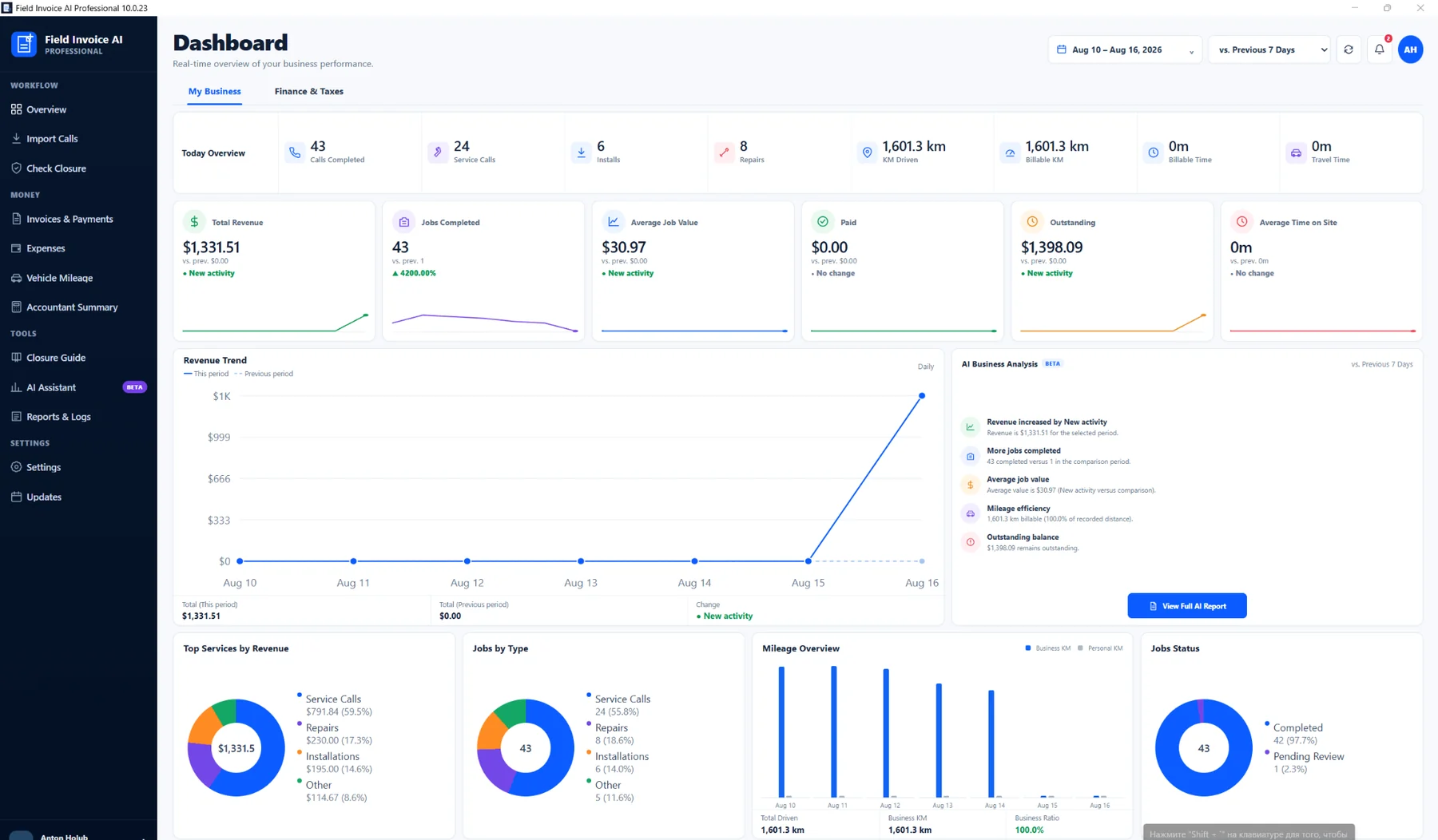
Field Invoice AI ProfessionalDashboard
Accountant-readyOne clean handoff
Mileage logBusiness routes synced
Receipt evidenceDigital proof attached
Your time belongs in the field — not in spreadsheets.
One workflow keeps the records moving while you keep working.
Automatic invoice creation
Validated closures become invoice-ready records without rebuilding the job by hand.
Less re-entry. Fewer missed details.Accountant-ready reporting
GST, expenses, mileage, deductions and invoice totals stay organized in one place.
Stop rebuilding the year at tax time.Business mileage log
Driversnote business routes and kilometers can flow into the same workspace automatically.
Keep a clear mileage trail for your records.Expense proof with receipts
Keep the expense and its digital receipt together instead of hunting through paper later.
Supporting records stay easy to find.From field activity to organized business records.
See how Field Invoice AI brings daily admin into one Windows workspace.
Product walkthroughAdd the YouTube link in the theme settings.
No year-end scavenger hunt.
Your accountant should not need you to spend hours rebuilding mileage, receipts and totals from different apps and paper folders.
Mileage logs
Expenses + receipts
GST + totals
Invoices
Keep supporting records together.If your accountant or CRA asks for documentation, your mileage logs, expenses and receipt evidence are easier to review and export.
Send the receipt. Keep moving.
Fuel stop, coffee, lunch or tools — tap through Telegram in seconds and let Field Invoice AI keep the expense organized.
✓Category, amount, vendor and receipt stay together in one record.
✓The digital receipt remains attached as supporting proof for accounting and tax records.
✓No paper receipt pile, separate scanning session or end-of-year manual re-entry.
Field Invoice AI Expensesguided expense capture
Add Expense
Category: Vehicle fuel
$58.00 · Shell
SHELL$58.00Digital receipt saved
✓ Captured and organized
Watch the Telegram expense workflow
See a receipt move from your phone into the program as an organized business expense.
Driversnote integration
Import business routes and mileage automatically instead of rebuilding a log by hand.
Google Drive backup
Protect business records with recovery copies outside the application installation.
AI business analysis
Review revenue, costs, trends and performance without spending hours assembling the picture yourself.
Gmail import
Bring authorized service-call closures into the workflow instead of copying them manually.
Control everything without jumping between tools.
Invoices, expenses, mileage, reports and AI analysis stay connected around the same business data.
Know where the money and time are going.
Use AI-assisted analysis to understand revenue, job activity, expenses, mileage and outstanding payments faster — without building a separate spreadsheet first.
RevenueCostsTrendsOutstandingWorkload
Do the job once. Reuse the data everywhere.
Import the closureBring service-call data into the workspace.
Create the invoiceUse validated job data instead of rebuilding it.
Capture expenses & mileageTelegram receipts and Driversnote routes feed the same records.
Keep reports currentGST, totals and supporting records stay together.
Hand off clean dataGive your accountant organized information instead of a year-end pile.
Start saving admin time with the plan that fits your workflow.
What people usually ask first.
What does AI do?
AI interprets technician closures and helps explain business performance. Deterministic rules still control validation and pricing.
Can I keep receipts digitally?
Telegram expense capture keeps the digital receipt attached to the expense record so supporting documentation stays easy to review later.
Can mileage sync automatically?
Driversnote routes can be synchronized into Vehicle Mileage while preserving Business / Personal classification.
Can this help with accountant and CRA records?
The application keeps mileage logs, expenses, receipts, GST and invoice data organized in one workspace so supporting records are easier to review and export when requested.
Is there a free trial?
Professional includes a 30-day free trial after installation and registration.
Your time is worth more than paperwork.
Invoice faster. Keep records ready. Spend less of your day on admin.
SMARTER WORKFLOW. AUTOMATIC INVOICES.
AI-POWERED AUTOMATION FOR YOUR FIELD SERVICE BUSINESS
Field Invoice AI reads authorized Gmail closures, validates the work, creates invoice-ready records, tracks mileage and gives you a clear view of your field-service business.
Windows Professional
30-Day Free Trial
Your Data Is Preserved
Field Invoice AI ProfessionalDashboard
AI Closure Analysis
Understands technician closures and extracts the key work details.
Automatic Invoice Creation
Turns validated calls into professional invoice-ready records.
Full Business Analysis
Revenue, jobs, expenses, mileage and outstanding payments.
Telegram Expense Automation
Capture business expenses and receipts from your phone in seconds.
Driversnote Integration
Imports routes and mileage with Business / Personal separation.
Gmail Integration
Imports service-call closures directly from authorized email.
Automatic Backup
Protects data in a local folder or Google Drive.
START WITH PROFESSIONAL
Try the complete workflow with your own field-service data.
Start free, connect the tools you already use and keep your workspace protected from day one.
30DAYS FREE
NO COMMITMENT TO START
30 days free after installation & registration
Use Field Invoice AI Professional with your real workflow. Your invoices, calls, mileage, settings and workspace data remain saved if the trial ends, so you can activate later and continue where you stopped.
MILEAGE INTEGRATION
Driversnote connected workflow
Synchronize mileage and routes while preserving Business / Personal classification and your manual overrides.
Business / Personal classification stays protectedBACKUP & RECOVERY
Local folder or Google Drive
Create protected recovery copies outside the application installation and choose where your backups are stored.
Local folder · Google Drive
AI that removes repetitive administration
Dozens of completed service calls. Minutes instead of hours.
Field Invoice AI can process a full batch of technician closures, validate the work, classify jobs, apply pricing rules and prepare the weekly invoice in automated mode. The goal is simple: keep the engineer focused on field work instead of repetitive office work.
Human-language closure understanding
Deterministic validation before billing
Operational and financial visibility
REAL WORKFLOW RESULT
< 3 min
Automated batch invoice preparation
Analyze, validate, classify and prepare dozens of completed service calls for invoicing without manually rebuilding every row.
Closure recognition
Required-field validation
Work-type classification
Rate calculation
Invoice-ready output
One connected AI workflow
From raw technician closure to invoice and business intelligence.
AI handles interpretation. Deterministic code validates the business rules, calculations and final records.
Import service calls
Bring closure emails into the selected period through Gmail and keep every call traceable.
Source data capturedAI reads the closure
Understand work type, action, serial numbers, tests, quantities and the technician's unstructured wording.
Meaning extractedRules validate the job
Check mandatory evidence and business logic before any job is allowed into the invoice.
Data verifiedCreate the invoice
Classify approved calls, apply configured pricing and prepare the invoice in the required structure.
Invoice readyAnalyze the business
Combine revenue, jobs, mileage, expenses, deductions and outstanding balances into actionable insights.
Business updated
TELEGRAM EXPENSE AUTOMATION
Record the expense when it happens. Let Field Invoice AI handle the rest.
Turn Telegram into a fast mobile expense inbox for field work. At the gas station, parking lot, hardware store or client site, tap Add Expense, choose a category, enter the amount and vendor, attach the receipt and continue your day.
No evening data entry
Receipts stay attached
Structured categories
Ready for GST & reporting
9:41Telegram
Field Invoice AI Expensesbot · expense capture
Ready to log a business expense?Use the guided flow below.
Category
Vehicle fuelParking & tollsEquipment
$40.00
Shell
Receipt attachedPhoto saved with expense
Expense savedReady to sync with Field Invoice AI
Field Invoice AIExpenses
Today$40.00
CategoryVehicle fuel
ShellVehicle fuel · Receipt attached
$40.00Telegram connectedExpense imported into the same accounting workflow
- Expense immediately joins totals and category reporting
- Receipt remains linked to the record
- Manual Sync and automatic sync are both available
- One guided workflow instead of typing the same data twice
Capture at the point of purchase
Log fuel, parking, tools, software or other business costs before the receipt disappears into a pocket or glove box.
One consistent expense format
Category, amount, vendor and receipt arrive as structured data instead of scattered notes and photos.
Accounting stays current
Imported expenses feed the same expense totals, GST calculations, reports and accountant-ready records already used by the application.
Simple setup
Create a Telegram bot, paste the token and Chat ID in Field Invoice AI, and the application builds the guided buttons and categories automatically.
See it in action
See how Telegram turns a receipt into a tracked business expense
Show the complete mobile flow: Add Expense → Category → Amount → Vendor → Receipt → Field Invoice AI. This is the fastest way to explain the value of the feature to a technician or contractor.
Phone captureTelegramExpense recordReporting
Paste the video link in WordPress → Appearance → Field Invoice AI → Telegram Expense Automation video URL. The player appears automatically.
Current Professional highlights
AI is integrated into the process — not added as a separate chatbot.
Every feature is designed around the operational workflow of a field technician and contractor.
Smart Closure Analysis
Reads technician notes, detects work type, actions, Old/New serials, tests, quantities and missing information.
Deterministic validation
AI interpretation is checked against required fields and company-specific closure rules before billing.
Automatic Invoice Creation
Validated calls are classified, priced and converted into invoice-ready records with minimal manual entry.
Telegram Expense Automation
Capture business expenses from your phone with guided category, amount, vendor and receipt steps, then sync them directly into the Field Invoice AI expense workflow.
Gmail service-call import
Import service-call emails for a selected period and keep New, Need Review, Skipped and In Invoice records visible.
Driversnote Integration
Import routes and mileage directly from Driversnote, preserve Business / Personal trip classification and keep manual classification changes protected from future sync.
AI Business Analysis
Interpret revenue, job volume, average value, mileage efficiency and outstanding balances in context.
Automated Accountant Reporting
Prepare structured income, expense, mileage, deduction and tax-ready summaries for your accountant.
Local + Google Drive Backup
Back up the Professional workspace to a local folder or Google Drive, with protected recovery copies kept outside the installation folder.
Real application. Real workflow.
Designed around what happens after the technician finishes the job.
Field Invoice AI turns operational data into structured records without hiding exceptions. Every AI decision can be checked against the source closure and deterministic rules.
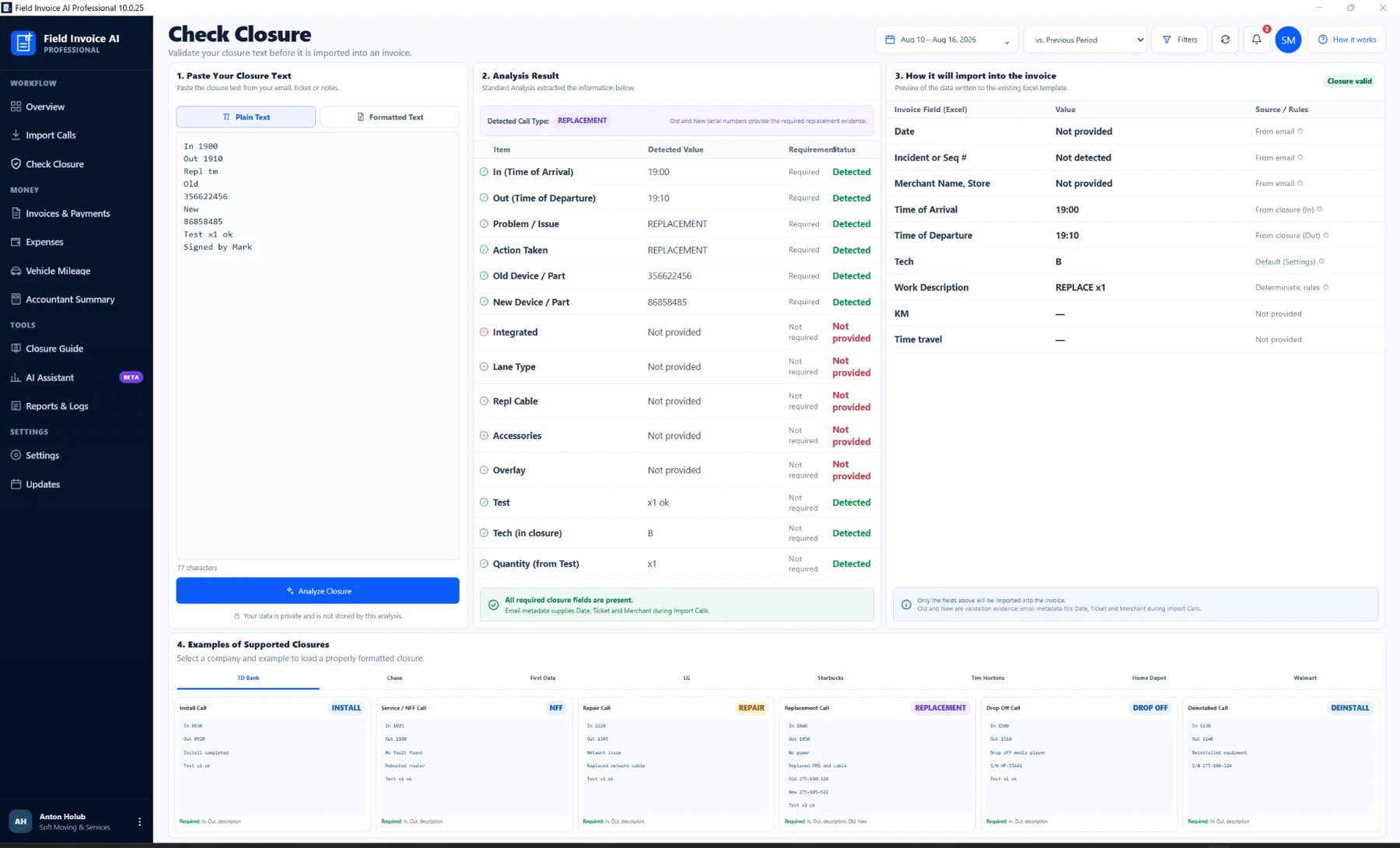
01 · UNDERSTAND
Closure Intelligence
Unstructured field notes become detected values, validation status and a clean invoice mapping.
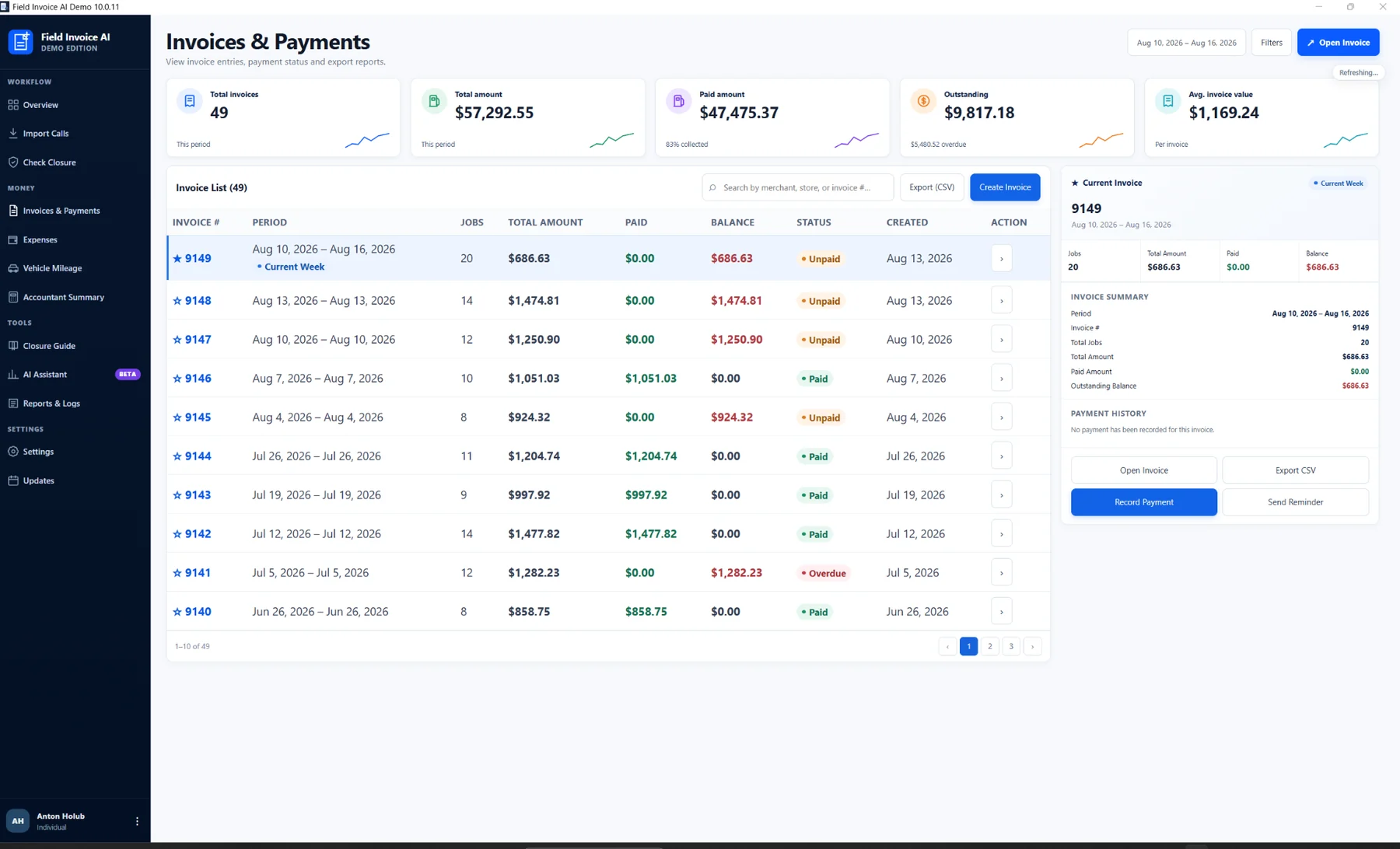
02 · EXECUTE
Invoice Automation
Approved service calls flow into the invoicing workspace with totals, balances and payment status.
03 · LEARN
Business Intelligence
The same operational data powers revenue, job, mileage and AI performance analysis.
The design principle behind the product
AI understands the work. Code validates and executes the business process.
Critical pricing, validation and accounting behavior stays deterministic while AI handles the unstructured information humans naturally create.
Interpret human information
- Understand technician closure language
- Detect work type and actions performed
- Extract serial numbers, tests and quantities
- Generate contextual business insights
+
Protect business logic
- Validate required fields and evidence
- Apply pricing and classification rules
- Generate consistent invoice records
- Preserve financial data integrity
Current Professional interface
See the actual application screens behind the automation.
Fresh captures from the current Professional design — Dashboard, Check Closure, invoices, rules and Settings.
AI Closure Analysis
Automatic invoicing
Business intelligence
Telegram expense capture
Rules, backup & control
Show the complete workflow
Watch the complete closure-to-invoice workflow
Use the walkthrough to demonstrate how a technician closure moves from source data through AI analysis, deterministic validation, invoice creation and business reporting.
- Gmail import and service-call review
- AI Closure Analysis and validation rules
- Invoices, Driversnote mileage and accountant reporting
Paste your YouTube link in WordPress → Appearance → Field Invoice AI → YouTube video URL. The video appears here automatically.
Your product walkthrough will appear here
Paste the YouTube URL in the theme settings. No code editing is required.
Recommended: 16:9 · 1080p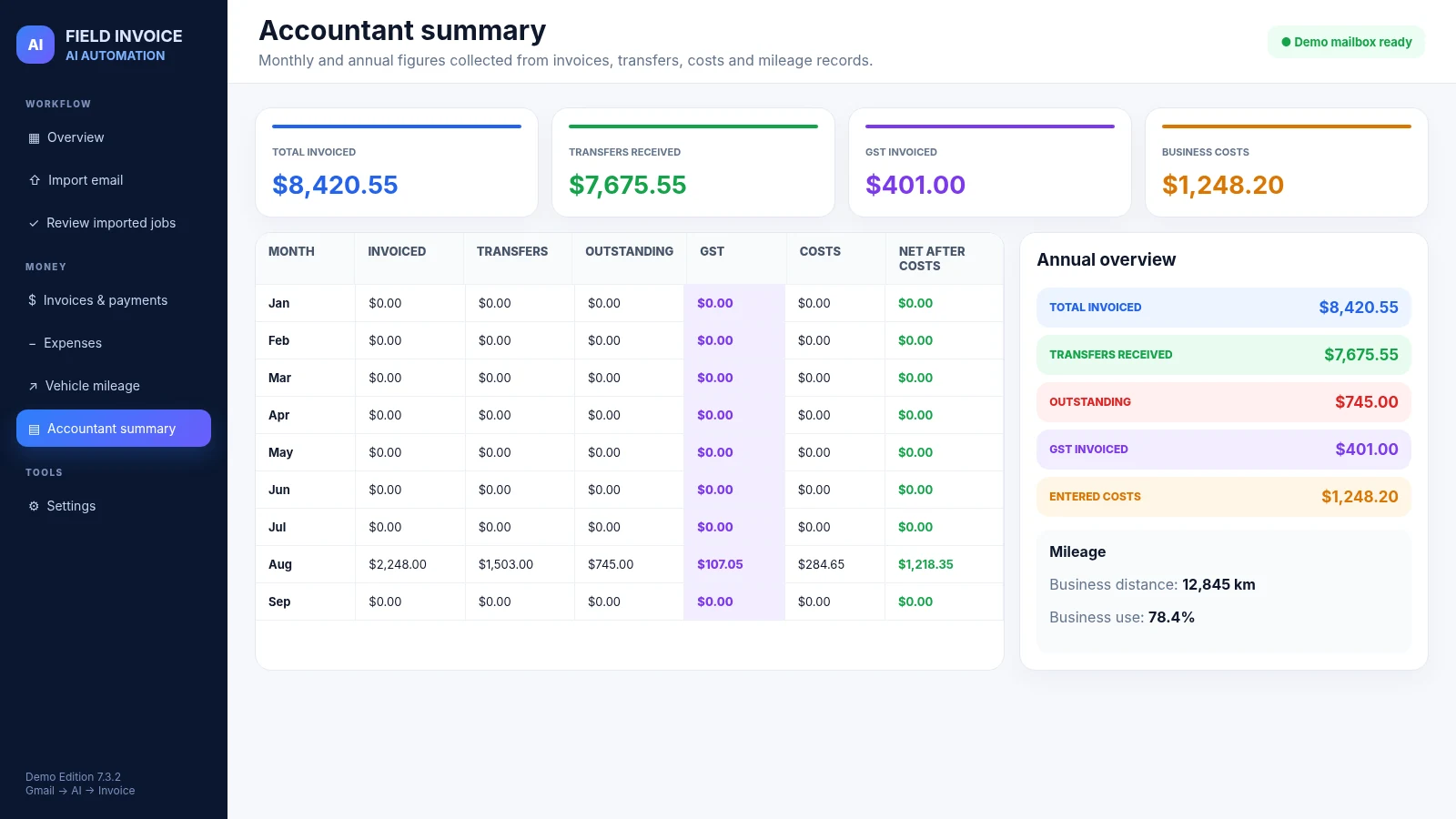
Automated accountant reporting
Turn day-to-day field activity into structured financial reporting.
Income, expenses, mileage, deductions and tax-related totals are consolidated into reports that are easier to review with your accountant.
Income & expensesOperational totals organized by reporting period
Mileage & deductionsBusiness travel information connected to the same records
Tax-ready summariesStructured reports for review and export
Simple pricing. No hidden setup fees.
Choose the plan that fits how you work.
Every plan unlocks the complete Professional application: AI closure analysis, automatic invoicing, Telegram expense automation, business analytics, Driversnote mileage, reporting and the current update system.
Full invoice automation
Telegram expense automation
Secure licence activation
Automatic update checks
AI closure & business analysis
LOWEST COMMITMENT
Weekly
Try it in your real workflow without a large upfront payment.
CA$10every 7 days
About CA$43.33 per month
- Complete Professional AI workflow
- Automatic weekly renewal
- Cancel from the customer portal
- Keep existing invoices and records
MOST POPULARSave CA$100/year
BEST VALUE
Monthly
The smartest choice for engineers who use the app every week.
CA$35per month
Save 19% compared with weekly billing
- Complete Professional AI workflow
- Continuous licence and updates
- Self-service billing portal
- Priority plan for regular use
ONE PAYMENT
Lifetime
Own the purchased version permanently with no recurring charges.
CA$449one-time
Break-even after about 13 months
- No expiry date
- No recurring billing
- One activated computer
- Your invoices and records remain yours
Instant licence deliveryYour activation key is created and emailed automatically after payment.
Safe automatic updatesInstall, postpone or skip a release directly inside the application.
Your data stays yoursExisting invoices and records remain available even when a subscription ends.
Not ready to choose?
Download the working Demo
Try the current 10.0.19 Demo workflow before choosing Professional.
The Demo includes Dashboard, Import Calls, Check Closure, invoices, expenses, mileage, accountant reporting, AI Assistant and the current Professional-style interface using isolated synthetic data.
Frequently asked questions
How the AI automation works in practice.
The product combines AI interpretation with deterministic rules so critical invoicing behavior remains predictable.
What does AI actually do?
AI interprets unstructured technician closures, detects the type of work, actions, serial numbers, test results, quantities and missing information. It also generates contextual business insights from operational data.
Does AI decide the invoice price?
No. AI identifies the work. Deterministic business rules validate the job, apply configured classifications and calculate pricing so critical financial behavior remains consistent.
Can the software create invoices automatically?
Yes. Approved service calls are converted into invoice-ready records after closure analysis and validation, reducing manual entry across a full batch of jobs.
How does Gmail integration work?
Authorized service-call emails can be imported for a selected period and reviewed as New, Need Review, Skipped or already invoiced records.
How does Driversnote integration work?
Driversnote routes and mileage can be synchronized into the Vehicle Mileage workspace while preserving Business/Personal classification and manual overrides.
What is AI Business Analysis?
The Dashboard uses operational data to explain changes in revenue, completed jobs, average job value, mileage efficiency, outstanding balances and other business indicators.
What is included in accountant reporting?
Structured income, expense, mileage, deduction and tax-related summaries can be prepared for accountant review and export.
Is there a free trial?
Yes. After installation and registration, Professional includes 30 days of free use. Your existing invoices, service calls, mileage, settings and workspace records remain saved if the trial ends, so you can activate later and continue with the same data.
Is my workspace backed up?
Professional can create backups in a local folder or in Google Drive. Recovery archives are kept separate from the application installation so your business records are easier to protect and restore.
Buy or request information
Ready to stop creating invoices manually?
Send a purchase request, ask a product question or request help with the Demo Edition using the form.